
TreeComp
|
|
TreeComp |
TreeComp is an interactive utility to keep 2 directory trees
and the files within the directories in sync. The combined tree
is displayed using a treeview control with icons indicating
the status per directory. Programs to view the differences
(i.e. Microsoft's WinDiff or
WinMerge) between files with the same name
can be launched by double-clicking, as well as editors for a
file residing in one of the 2 trees. After inspection files can
be copied/deleted interactively as desired. In our organization
we view this program as an indispensable tool that is far beyond
xcopy /s /e.
TreeComp should work on all versions of Windows (95/98/NT 4/2000/XP/Vista/7/8/10 and Windows Server 2003/2008/2012/2016).
Have fun!
Updates are temporarily disabled. Sorry for the inconvenience.
On May 25th, 2023 I released TreeComp 4.0 b62. This version fixes several issues with the 64-bit version, reported by Nick Angelopoulos. Many thanks for reporting, Nick!
On May 19th, 2023 I released TreeComp 4.0 b61. This version fixes a problem with non-spacing Unicode directory names.
On November 6th, 2019 I released TreeComp 4.0 b57. This version adds the option to overwrite files with mismatching attributes or content (i.e., the files with the purple icon) as requested by Pete Holzmann and Mursalin Simpson. Thank you both!
Version 3.2 improved the way it handles changes not induced by the program itself, but for instance by copying files to a directory currently inspected using TreeComp. Monitoring threads "watch" the trees for changes and will eventually incorporate the changes. If you encounter problems with this feature there is still the possibility of switching it off using Options | Monitoring Thread.
Version 3.3 allowed for opening files using its associated program by using the context menu. Furthermore, backups of files that are older can be stored in a new directory with a name based on the current day.
Version 3.4 introduced a build-in FTP client, so since then it is ideal for updating your home page at your Internet Service Provider. The selection of directories to compare is facilitated by using a new software component that resembles the left pane window of Windows Explorer. A help file is released since this version. If you have a question unanswered by the help file, feel free to drop a line!
Version 3.5 was the first version distributed as FREEWARE! Various bugs were solved. Version 3.5 solved a problem comparing files on a remote server under Windows 95/98.
Version 3.6, introduced an option for multithreaded comparison. This allows for very fast comparisons: comparing 2 directory trees with 121.000 files having a total size of approximately 13 GB divided over 2.040 directories, took less than 11 minutes!
Since version 3.6, different ways of comparing both trees are present. Comparisons now can be done based on any combination of timestamp, content and attributes. This behavior can be controlled using command line parameters.
The last major improvement of TreeComp 3.6 is its ability to synchronize a complete branch from the left hand side to the right hand side, using the context menu of the treeview and selecting "Advanced" | "Synchronize left to right" or the other way around.
Version 3.7 added stable multi-threading and support for ZIP files. FTP support is now based on WinInet FTP APIs. This should allow for handling a wider variety of FTP servers. The user interface for selecting the way the comparison should be performed is now highly flexible. Another new feature allows for displaying recent files only.
Version 3.8 added support for profiles to store frequently used pairs of directories and support for the popular RAR file format.
TreeComp 3.10 contained a minor fix related to sorting of Norwegian file names, where Aa follows Z. Furthermore, special characters are now correctly stored in the snapshot (.TCS) file. It also added support for profiles to store frequently used pairs of directories, ZIP and RAR files.
Version 4.0 b1 was released on February 10th, 2010. It was the first version to add full Unicode support. Furthermore, new command line flags have been added:
TreeComp 4.0 b2 was released on February 15 2010. It fixes a minor display issue that was introduced in TreeComp 4.0 b1. Furthermore, it correctly adds attributes for files that exist on the right hand side only. Thank you Laci for reporting this!
TreeComp 4.0 b3 was released on February 16 2010. This version sorts the directories in the "Select directories" window as older versions also did. Laci, thanks again!
TreeComp 4.0 b4 was released on March 8th 2010. This version only compares a selection of attributes to mask out irrelevant attributes (e.g. FILE_ATTRIBUTE_OFFLINE). Thanks Detlef Hoyer!
On April 14th 2010 TreeComp 4.0 b5 was released. This version fixed processing of the command line options /SYNCHRONIZE_LEFT_TO_RIGHT and /SYNCHRONIZE_RIGHT_TO_LEFT. Thanks to mariopac for reporting this!
On May 7th 2010 I released TreeComp 4.0 b6. This version utilizes a virtual listview for quicker updates of long file lists. This also reduces flicker.
On May 14th 2010 I released TreeComp 4.0 b7. This version preserves folder attributes when a new folder is created (Thanks Albert Ballast!). Furthermore, the "Copy masked files too ?" question now only pops up when a mask is defined and the icon should no longer disappear for a selected item (thanks Kristen Bellsworth!).
On May 27th 2010 I released TreeComp 4.0 b8 including a.o. the option to change the color scheme (Thanks cjl/CLASystems) and corrected the "Send to Recycle Bin" option (Thanks Geir Klemetsen). Furthermore, it looks into .lnk files to find the target file name (Thanks again Geir Klemetsen).
On July 8th 2010 I released TreeComp 4.0 b10. Main new features are: corrected auto size of columns (when pressing [Ctrl]+[+] or double clicking on divider), use Tahoma font for better visualization of Unicode characters, faster scanning, corrected comparison by content (Thanks Luciano Vernaschi), fixed selection of list view after file copy and indicated time remaining (Thanks again Kristen Bellsworth).
On July 8th 2010 I released TreeComp 4.0 b11. It fixes a bug with masks in 4.0 b10, which gave unexpected results. Also, the tool tips were corrected and the color of the green label was adjusted. (Thanks Charles Lasner/CLASystems).
On July 9th 2010 I released TreeComp 4.0 b12. Several "Select" functions to context menu of listview were added, the location of .tcs/.sql file is now configurable and the progress bars for >1GB bytes were fixes, among other minor fixes (Thanks once more Charles Lasner/CLASystems and Kristen Bellsworth).
On July 13th 2010 I released TreeComp 4.0 b14. The main new feature was support for multiselect in the Tree View control: now multiple nodes can be selected by pressing Ctrl or Shift while selecting nodes. All functions in the right click menu now operate on all selected nodes. Furthermore, the icons in the center which control filtering were changed for better visibility on Luna and Aero theme (Thanks again Charles Lasner/CLASystems!).
On August 18th 2010 I released TreeComp 4.0 b15. This is quite a dramatic change internally compared to previous versions. The main improvement is that TreeComp now has improved performance, in some situations it can be up to three times faster. As requested by cjl/CLASystems I added an options to switch off themes.
On August 30th 2010 I released TreeComp 4.0 b16. I corrected handling of long path names (>260 characters) as reported by Pete Webbed. Besides, I also tried to address an issue where the "Open Existing ZIP File" dialog did not show up (thanks Kristen Bellsworth!).
On September 7th 2010 I released TreeComp 4.0 b17. There was a problem with profiles no longer being saved that I corrected (thanks Paolo Modesti!).
On September 22th 2010 I released TreeComp 4.0 b18 and subsequently 4.0 b19. I moved the profile menu to the main menu and added a button to change the pair of directories as requested by Paolo Rosati. Furthermore, the time stamp for files with a path name exceeding MAX_PATH was corrected (thanks Pete Webbed!). The GUI was slightly altered to have more clear indicators at the top (i.e. for the "Show/Hide" tool buttons at the center). The appearance now depends on themes being enabled or not. With this version it is possible to switch the "network drive" background image on or off. Version 4.0 b19 fixed a problem with saving a new profile.
On November 8th 2010 I released TreeComp 4.0 b20. Main improvements are: Faster file copy, new icons in context menu (thanks Joachim Schulz!), corrected parsing of /PROFILE switch (thanks Michael Riebschläger!), also copy timestamp of folders and show entire dialogs for "Large Fonts" (thanks Maurits van Dueren den Hollander!), save global options and profile options in all situations (thanks Peter van de Ven!)
On November 9th 2010 I released TreeComp 4.0 b21. It fixes an "index out of bounds" problem introduced with version 4.0 b20 (thanks again cjl/CLASystems!).
On November 10th 2010 I released TreeComp 4.0 b22. It fixes weird behavior in the "Select directories" dialog.
On November 30th 2010 I released TreeComp 4.0 b23. It accepts a single folder on the command line and disables controls while scanning and copying as requested by Guido Eisenbeis. Added autocompletion to the "Select Directories" dialog.
On December 7th 2010 I released TreeComp 4.0 b24. It fixes a problem with tildes ('~') in the directory names and disables the toolbars while scanning, thanks again Guido Eisenbeis!
On March 15th 2011 I released TreeComp 4.0 b25. It improves interrupts and disables the GUI completely while scanning or copying (thanks Peter van de Ven!). I also addressed a rare problem with the location of the TreeComp window after minimize and restore while copying (thanks again Peter van de Ven). Next, I fixed a bug to include the offset from UTC to show the correct date for files (thanks Peter Remeijer). Finally, I added a prefix option that also allows to move files from one folder to another using "Rename or Move" or "Prefix" from the context menu.
On March 30th 2011 I released TreeComp 4.0 b26. A fix was added for the tool buttons "Copy more recent files from <left> to <right>" and "Copy more recent files from <right> to <left>": when unmatching files (e.g. left only) were selected they were erroneously copied, allow to move files from TreeComp to e.g. Windows Explorer using drag and drop by pressing the Shift key, use asynchronous drag and drop to keep TreeComp responsive, correctly populate list of files to drop (3 times thanks to Nicolas SPORN). Enclosed all arguments containing spaces in double quotes to the File Comparison Utility and the Editor, not only existing files or directories (Thanks Bob Brand). Fixed a bug where File Comparison Utility (e.g. WinDiff) or the Editor was opened an infinite number of times (happened when multiple items were selected).
On April 1st 2011 I released TreeComp 4.0 b27. It fixes FTP downloads, that were broken since 4.0 b15 (Thank a lot Alex Howell!). Furthermore, I tried to make auto completion work more smoothly in the "Select Directories" dialog.
On April 1st 2011 I released TreeComp 4.0 b28. This version should no longer show a prompt about filtering for empty filters (thanks Kristen Bellsworth). The implementation of autocompletion in the "Select Directories" dialog was improved.
On April 16th, 2012 I finally released TreeComp 4.0 b29. It is a minor update and includes a fix to create, list and delete directories with trailing spaces correctly, thanks Niels Dekker!
On May 4th, 2012 I released TreeComp 4.0 b31 containing a minor fix on top of 4.0 b30.
On May 3th, 2012 I released TreeComp 4.0 b30.
The main change with respect to all previous versions is that this version
writes all settings to TreeComp.ini, stored in %APPDATA%\Quirt\TreeComp. I also added
a menu item Options, View settings file to view its contents. Existing settings in the
registry are migrated if TreeComp.ini does not yet exist.
It also includes a fix to move more than one file without an error message popping up,
thanks to Kristen Bellsworth for the bug report!
On May 7th, 2012 I released TreeComp 4.0 b32. This version fixes a bug in the migration of
existing profiles to TreeComp.ini. By default, the settings file TreeComp.ini is now stored
in the directory where TreeComp.exe is installed. If TreeComp is unable to write here,
it uses %APPDATA%\Quirt\TreeComp instead. This version should no longer write any settings
to the registry. Thanks to Peter van de Ven and Paul Rain for their feedback!
On May 30th, 2012 I released TreeComp 4.0 b33. This version fixes a bug when two or more
monitors are used. Thanks to Colin Clarke for his feedback!
On July 23th, 2012 I released TreeComp 4.0 b34. This version fixes a bug with sorting
of directories differing only by e.g. a '.' and '+', e.g. 'hello+there' and
'hello.there'. I also added an option to create a folder directory from the
Select Directories dialog, for convenience.
On October 25th, 2012 I released TreeComp 4.0 b35. This version contained fixes
for working with .zip and .rar files. Also, this is the first version that is
compiled with Delphi XE2. This opens the possibility to create a 64-bit
version of TreeComp, hopefully I will have the time to release this with
the upcoming version.
On October 25th, 2012 I released TreeComp 4.0 b36. This version allows rerouting of the TreeComp.ini file location using "IniLocation"
(currently needs manual editing), next to the possibility to sort profiles. This was requested by Tony Ians. Also, I
optimized the "Next Change" (F8) option as requested by Peter van de Ven. Finally, the question to update masked files
should only show up when relevant, thanks to Kristen Bellsworth.
On November 9th, 2012 I released TreeComp 4.0 b37. This is a quick fix for a problem with inherited filters within a profile.
On November 20th, 2012 I released TreeComp 4.0 b38. This version fixes a problem with empty filters for first time users.
It also allows to move a directory to a different location (e.g. specify NewDir\ExistingDir).
Finally, I fixed a few problems for "Large Fonts": it should keep the toolbars at the top properly aligned
and has the proper font size for the list view.
On February 20th, 2013 I released TreeComp 4.0 b39. This version has a progress bar on the taskbar button
and should display ETC (estimated time to completion) also when it takes more than a day (as requested by
Steven van de Brink).
On June 18th, 2013 I released TreeComp 4.0 b40. This version has two new tool button to synchronize
directories to the left or to the right as requested by Theodor Sauerwein.
On June 26th, 2013 I released TreeComp 4.0 b41.
This version has improved handling of interrupted scans and handles "out of memory" more gracefully,
thanks to Niels Dekker! Also prefixing was modified, this should be faster now.
On October 10th, 2013 I released TreeComp 4.0 b42.
This version now supports 5 color schemes rather than 2:
Blue/Red, Green/Red, Blue/Pink, Green/Pink and Blue/Yellow, as requested by Andrew Barnes.
On February 12th, 2014 I released TreeComp 4.0 b44.
This is the first version that includes 64-bit support! Of course, a 32-bit version is also provided.
On March 10th, 2014 I released TreeComp 4.0 b45.
This version preserves creation date, as requested by Giorgio Cupertino.
On March 24th, 2014 I released TreeComp 4.0 b46.
This version fixes a bug with preserving case of folder names in a ZIP or RAR file, as pointed out by John Wightman. Many thanks for your bug report!
On June 19th, 2014 I released TreeComp 4.0 b47.
This version supports /KEEP_RECENT in combination with /SYNCHRONIZE_LEFT_TO_RIGHT or SYNCHRONIZE_RIGHT_TO_LEFT. This option was requested by Dr. Ulrich Meßmer, many thanks for your feedback!
On May 1st, 2015 I released TreeComp 4.0 b48.
This version fixes an issue with the /NOGUI option. Also the listview control to show the file overview was updated.
On September 25th, 2015 I released TreeComp 4.0 b49.
This version fixes an issue with the location of temporary files. Next, it allows UTF8 encoded file names on FTP servers as requested by Nicolas SPORN.
On December 12th, 2016 I released TreeComp 4.0 b50. After a notification by Michael Walden I fixed a mistake where the x64 and x86 versions got mixed up, thank you Michael!
This version has a fix for launching Windows Explorer for directories containing commas, thanks Michael Walden! Next, it fixes an issue
with "Synchronize from Left to Right" (or the other way around), thanks JonathanMSN Bach! Finally, it will add more details to the
summary (with the /summary:out.txt option) as requested by Mark Bevan.
On April 3rd, 2017 I released TreeComp 4.0 b51. After receiving a message by Han Leushuis I fixed a mistake
in the way the command line switch /SYNCHRONIZE_TWO_WAY was handled, thank you Han!
It also fixes an issue with files that could not immediately be removed as reported by Otmar S. These files are
now added to the list of files to be deleted forcefully, thank you for your feedback Otmar.
On January 8th, 2019 I released TreeComp 4.0 b52. After receiving a message by Pete Holzmann I fixed a mistake
in the way files were compared by content for files larger than 2 gigabytes, thank you very much Pete!
It also added the option to pause file copy operations, as requested by Mickey Cohen, thank you Mickey!
On April 8th, 2019 I released TreeComp 4.0 b53. After receiving a message by Pete Holzmann I fixed a mistake
in the way directory names containing hyphens were handled, thank you very much Pete!
It also added the option to handle path names longer than MAX_PATH (260) characters, as reported by Nicolas SPORN, thank you Nicolas!
On July 9th, 2019 I released TreeComp 4.0 b54. After receiving a message by Guido Eisenbeis I fixed another mistake
in the way directory names containing hyphens were handled, thank you very much Guido!
It also added the option to use a green/red color schema as requested by Thomas "openended", thank you Thomas!
On August 23rd, 2019 I released TreeComp 4.0 b55. This version has the option to show file sizes using a metric prefix, e.g. 1.3 MB, thanks again Guido!
On September 5th, 2019 I released TreeComp 4.0 b56. This version has a small fix for the "metric prefix" option (inspired by Guido Eisenbeis) and adds support for the F2 key in the "Select Directories" window as requested by Dr. Ulrich Meßmer. It also ships with the correct version of the help file as kindly pointed out by Dr. Ulrich Meßmer. Thank you both!
Using Version 3.5 it is not possible to select a drive (i.e. C:\) to compare.
Symptons are: "Directory C:\ not found", while C: (or any other drive like A:, G:)
in fact does exist. Then the program reports "Cannot focus a disabled or invisible window".
TreeComp 3.6 fixed this problem.
If one wants to continue using version 3.5 use TreeComp's command line interface. Open
a command prompt and then type "<path to TreeComp>\TreeComp.exe C: G:". By
default, the path to TreeComp is "C:\Program Files\TreeComp". In that case type at the
command prompt: '"C:\Program Files\TreeComp\TreeComp.exe" C: G:', without the single quotes
but with the double quotes.
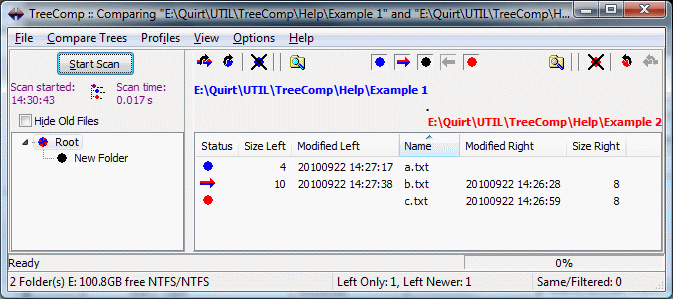
The program in action looks like this:
Help file
TreeComp.chm (127 KB)
Introduction written by Marco Paganini
Use_of_TreeComp_for_data_backup.doc (104 KB)
32-bits Latest Version (4.0 b62) with install & uninstall support
TreeCompLatest.zip (2.034 MB)
32-bits Latest Version (4.0 b62) without install & uninstall
TreeCompLatest_noinstall.zip (2.383 MB)
64-bits Latest Version (4.0 b62) with install & uninstall support
TreeCompx64Latest.zip (2.341 MB)
64-bits Latest Version (4.0 b62) without install & uninstall
TreeCompx64Latest_noinstall.zip (2.385 MB)
32-bits Version 4.0 b62 with install & uninstall support
TreeComp20230525.zip (2.034 MB)
32-bits Version 4.0 b62 without install & uninstall
TreeComp20230525_noinstall.zip (2.383 MB)
64-bits Version 4.0 b62 with install & uninstall support
TreeCompx64_20230525.zip (2.341 MB)
64-bits Version 4.0 b62 without install & uninstall
TreeCompx64_20230525_noinstall.zip (2.385 MB)
32-bits Version 4.0 b61 with install & uninstall support
TreeComp20230519.zip (2.034 MB)
32-bits Version 4.0 b61 without install & uninstall
TreeComp20230519_noinstall.zip (2.865 MB)
64-bits Version 4.0 b61 with install & uninstall support
TreeCompx64_20230519.zip (2.340 MB)
64-bits Version 4.0 b61 without install & uninstall
TreeCompx64_20230519_noinstall.zip (2.383 MB)
32-bits Version 4.0 b57 with install & uninstall support
TreeComp20190905.zip (1.818 MB)
32-bits Version 4.0 b57 without install & uninstall
TreeComp20190905_noinstall.zip (2.106 MB)
64-bits Version 4.0 b57 with install & uninstall support
TreeCompx64_20190905.zip (2.064 MB)
64-bits Version 4.0 b57 without install & uninstall
TreeCompx64_20190905_noinstall.zip (2.520 MB)
32-bits Version 4.0 b56 with install & uninstall support
TreeComp20190905.zip (1.795 MB)
32-bits Version 4.0 b56 without install & uninstall
TreeComp20190905_noinstall.zip (2.102 MB)
64-bits Version 4.0 b56 with install & uninstall support
TreeCompx64_20190905.zip (2.056 MB)
64-bits Version 4.0 b56 without install & uninstall
TreeCompx64_20190905_noinstall.zip (2.513 MB)
32-bits Version 4.0 b55 with install & uninstall support
TreeComp20190823.zip (1.816 MB)
32-bits Version 4.0 b55 without install & uninstall
TreeComp20190823_noinstall.zip (2.099 MB)
64-bits Version 4.0 b55 with install & uninstall support
TreeCompx64_20190823.zip (2.058 MB)
64-bits Version 4.0 b55 without install & uninstall
TreeCompx64_20190823_noinstall.zip (2.511 MB)
32-bits Version 4.0 b54 with install & uninstall support
TreeComp20190709.zip (1.815 MB)
32-bits Version 4.0 b54 without install & uninstall
TreeComp20190709_noinstall.zip (2.099 MB)
64-bits Version 4.0 b54 with install & uninstall support
TreeCompx64_20190709.zip (2.057 MB)
64-bits Version 4.0 b54 without install & uninstall
TreeCompx64_20190709_noinstall.zip (2.509 MB)
32-bits Version 4.0 b53 with install & uninstall support
TreeComp20190408.zip (1.814 MB)
32-bits Version 4.0 b53 without install & uninstall
TreeComp20190408_noinstall.zip (2.098 MB)
64-bits Version 4.0 b53 with install & uninstall support
TreeCompx64_20190408.zip (2.057 MB)
64-bits Version 4.0 b53 without install & uninstall
TreeCompx64_20190408_noinstall.zip (2.509 MB)
32-bits Version 4.0 b52 with install & uninstall support
TreeComp20190108.zip (1.814 MB)
32-bits Version 4.0 b52 without install & uninstall
TreeComp20190108_noinstall.zip (2.099 MB)
64-bits Version 4.0 b52 with install & uninstall support
TreeCompx64_20190108.zip (2.058 MB)
64-bits Version 4.0 b52 without install & uninstall
TreeCompx64_20190108_noinstall.zip (2.509 MB)
32-bits Version 4.0 b51 with install & uninstall support
TreeComp20161213.zip (1.818 MB)
32-bits Version 4.0 b51 without install & uninstall
TreeComp20161213_noinstall.zip (2.103 MB)
64-bits Version 4.0 b51 with install & uninstall support
TreeCompx64_20161213.zip (2.062 MB)
64-bits Version 4.0 b51 without install & uninstall
TreeCompx64_20161213_noinstall.zip (2.511 MB)
32-bits Version 4.0 b50 with install & uninstall support
TreeComp20161213.zip (1.795 MB)
32-bits Version 4.0 b50 without install & uninstall
TreeComp20161213_noinstall.zip (1.582 MB)
64-bits Version 4.0 b50 with install & uninstall support
TreeCompx64_20161213.zip (2.056 MB)
64-bits Version 4.0 b50 without install & uninstall
TreeCompx64_20161213_noinstall.zip (2.571 MB)
32-bits Version 4.0 b49 with install & uninstall support
TreeComp20150925.zip (1.799 MB)
32-bits Version 4.0 b49 without install & uninstall
TreeComp20150925_noinstall.zip (2.114 MB)
64-bits Version 4.0 b49 with install & uninstall support
TreeCompx64_20150925.zip (2.047 MB)
64-bits Version 4.0 b49 without install & uninstall
TreeCompx64_20150925_noinstall.zip (2.554 MB)
32-bits Version 4.0 b48 with install & uninstall support
TreeComp20150501.zip (1.634 MB)
32-bits Version 4.0 b48 without install & uninstall
TreeComp20150501_noinstall.zip (1.420 MB)
64-bits Version 4.0 b48 with install & uninstall support
TreeCompx64_20150501.zip (1.779 MB)
64-bits Version 4.0 b48 without install & uninstall
TreeCompx64_20150501_noinstall.zip (2.113 MB)
32-bits Version 4.0 b47 with install & uninstall support
TreeComp20140619.zip (1.643 MB)
32-bits Version 4.0 b47 without install & uninstall
TreeComp20140619_noinstall.zip (1.429 MB)
64-bits Version 4.0 b47 with install & uninstall support
TreeCompx64_20140619.zip (1.789 MB)
64-bits Version 4.0 b47 without install & uninstall
TreeCompx64_20140619_noinstall.zip (2.139 MB)
32-bits Version 4.0 b46 with install & uninstall support
TreeComp20140310.zip (1.643 MB)
32-bits Version 4.0 b46 without install & uninstall
TreeComp20140324_noinstall.zip (1.429 MB)
64-bits Version 4.0 b46 with install & uninstall support
TreeCompx64_20140324.zip (1.789 MB)
64-bits Version 4.0 b46 without install & uninstall
TreeCompx64_20140324_noinstall.zip (2.139 MB)
32-bits Version 4.0 b45 with install & uninstall support
TreeComp20140310.zip (1.642 MB)
32-bits Version 4.0 b45 without install & uninstall
TreeComp20140310_noinstall.zip (1.429 MB)
64-bits Version 4.0 b45 with install & uninstall support
TreeCompx64_20140310.zip (1.788 MB)
64-bits Version 4.0 b45 without install & uninstall
TreeCompx64_20140310_noinstall.zip (2.140 MB)
32-bits Version 4.0 b44 with install & uninstall support
TreeComp20140212.zip (1.643 MB)
32-bits Version 4.0 b44 without install & uninstall
TreeComp20140212_noinstall.zip (1.429 MB)
64-bits Version 4.0 b44 with install & uninstall support
TreeCompx64_20140212.zip (1.788 MB)
64-bits Version 4.0 b44 without install & uninstall
TreeCompx64_20140212_noinstall.zip (2.139 MB)
Version 4.0 b42 with install & uninstall support
TreeComp20131008.zip (1.583 MB)
Version 4.0 b42 without install & uninstall
TreeComp20131008_noinstall.zip (1.358 MB)
Version 4.0 b41 with install & uninstall support
TreeComp20130626.zip (1.581 MB)
Version 4.0 b41 without install & uninstall
TreeComp20130626_noinstall.zip (1.357 MB)
Version 4.0 b40 with install & uninstall support
TreeComp20130618.zip (1.582 MB)
Version 4.0 b40 without install & uninstall
TreeComp20130618_noinstall.zip (1.357 MB)
Version 4.0 b39 with install & uninstall support
TreeComp20130220.zip (1.582 MB)
Version 4.0 b39 without install & uninstall
TreeComp20130220_noinstall.zip (1.357 MB)
Version 4.0 b38 with install & uninstall support
TreeComp20121120.zip (1.582 MB)
Version 4.0 b38 without install & uninstall
TreeComp20121120_noinstall.zip (1.357 MB)
Version 4.0 b37 with install & uninstall support
TreeComp20121109.zip (1.582 MB)
Version 4.0 b37 without install & uninstall
TreeComp20121109_noinstall.zip (1.357 MB)
Version 4.0 b36 with install & uninstall support
TreeComp20121108.zip (1.582 MB)
Version 4.0 b36 without install & uninstall
TreeComp20121108_noinstall.zip (1.357 MB)
Version 4.0 b35 with install & uninstall support
TreeComp20121025.zip (1.580 MB)
Version 4.0 b35 without install & uninstall
TreeComp20121025_noinstall.zip (1.356 MB)
Version 4.0 b34 with install & uninstall support
TreeComp20120723.zip (1.166 MB)
Version 4.0 b34 without install & uninstall
TreeComp20120723_noinstall.zip (938 MB)
Version 4.0 b33 with install & uninstall support
TreeComp20120530.zip (1.165 MB)
Version 4.0 b33 without install & uninstall
TreeComp20120530_noinstall.zip (937 KB)
Version 4.0 b32 with install & uninstall support
TreeComp20120507.zip (1.165 MB)
Version 4.0 b32 without install & uninstall
TreeComp20120507_noinstall.zip (937 KB)
Version 4.0 b31 with install & uninstall support
TreeComp20120504.zip (1.165 MB)
Version 4.0 b31 without install & uninstall
TreeComp20120504_noinstall.zip (937 KB)
Version 4.0 b30 with install & uninstall support
TreeComp20120503.zip (1.165 MB)
Version 4.0 b30 without install & uninstall
TreeComp20120503_noinstall.zip (937 KB)
Version 4.0 b29 with install & uninstall support
TreeComp20120416.zip (1.159 MB)
Version 4.0 b29 without install & uninstall
TreeComp20120416_noinstall.zip (931 KB)
Version 4.0 b28 with install & uninstall support
TreeComp20110523.zip (1.156 MB)
Version 4.0 b28 without install & uninstall
TreeComp20110523_noinstall.zip (928 KB)
Version 4.0 b27 with install & uninstall support
TreeComp20110401.zip (1.156 MB)
Version 4.0 b27 without install & uninstall
TreeComp20110401_noinstall.zip (928 KB)
Version 4.0 b26 with install & uninstall support
TreeComp20110330.zip (1.156 MB)
Version 4.0 b26 without install & uninstall
TreeComp20110330_noinstall.zip (928 KB)
Version 4.0 b25 with install & uninstall support
TreeComp20110315.zip (1.156 MB)
Version 4.0 b25 without install & uninstall
TreeComp20110315_noinstall.zip (928 KB)
Version 4.0 b24 with install & uninstall support
TreeComp20101207.zip (1.155 MB)
Version 4.0 b24 without install & uninstall
TreeComp20101207_noinstall.zip (927 KB)
Version 4.0 b23 with install & uninstall support
TreeComp20101130.zip (1.155 MB)
Version 4.0 b23 without install & uninstall
TreeComp20101130_noinstall.zip (927 KB)
Version 4.0 b22 with install & uninstall support
TreeComp20101110.zip (1.159 MB)
Version 4.0 b22 without install & uninstall
TreeComp20101110_noinstall.zip (935 KB)
Version 4.0 b21 with install & uninstall support
TreeComp20101109.zip (1.159 MB)
Version 4.0 b21 without install & uninstall
TreeComp20101109_noinstall.zip (935 KB)
Version 4.0 b20 with install & uninstall support
TreeComp20101108.zip (1.154 MB)
Version 4.0 b20 without install & uninstall
TreeComp20101108_noinstall.zip (926 KB)
Version 4.0 b19 with install & uninstall support
TreeComp20100922.zip (1.168 MB)
Version 4.0 b19 without install & uninstall
TreeComp20100922_noinstall.zip (940 KB)
Version 4.0 b17 with install & uninstall support
TreeComp20100907.zip (1.167 MB)
Version 4.0 b17 without install & uninstall
TreeComp20100907_noinstall.zip (939 KB)
Version 4.0 b16 with install & uninstall support
TreeComp20100830.zip (1.167 MB)
Version 4.0 b16 without install & uninstall
TreeComp20100830_noinstall.zip (939 KB)
Version 4.0 b15 with install & uninstall support
TreeComp20100818.zip (1.168 MB)
Version 4.0 b15 without install & uninstall
TreeComp20100818_noinstall.zip (939 KB)
Version 4.0 b14 with install & uninstall support
TreeComp20100713.zip (1.165 MB)
Version 4.0 b14 without install & uninstall
TreeComp20100713_noinstall.zip (937 KB)
Version 4.0 b12 with install & uninstall support
TreeComp20100709.zip (1.165 MB)
Version 4.0 b12 without install & uninstall
TreeComp20100709_noinstall.zip (936 KB)
Version 4.0 b11 with install & uninstall support
TreeComp20100708.zip (1.164 MB)
Version 4.0 b11 without install & uninstall
TreeComp20100708_noinstall.zip (935 KB)
Version 4.0 b10 with install & uninstall support
TreeComp20100706.zip (1.163 MB)
Version 4.0 b10 without install & uninstall
TreeComp20100706_noinstall.zip (935 KB)
Version 4.0 b8 with install & uninstall support
TreeComp20100527.zip (1.153 MB)
Version 4.0 b8 without install & uninstall
TreeComp20100527_noinstall.zip (924 KB)
Version 4.0 b7 with install & uninstall support
TreeComp20100514.zip (1.153 MB)
Version 4.0 b7 without install & uninstall
TreeComp20100514_noinstall.zip (924 KB)
Version 4.0 b6 with install & uninstall support
TreeComp20100507.zip (1.153 MB)
Version 4.0 b6 without install & uninstall
TreeComp20100507_noinstall.zip (924 KB)
Version 4.0 b5 with install & uninstall support
TreeComp2010414.zip (1.120 MB)
Version 4.0 b5 without install & uninstall
TreeComp20100414_noinstall.zip (910 KB)
Version 4.0 b4 with install & uninstall support
TreeComp2010308.zip (1.120 MB)
Version 4.0 b4 without install & uninstall
TreeComp20100308_noinstall.zip (910 KB)
Version 4.0 b3 with install & uninstall support
TreeComp2010216.zip (1.120 MB)
Version 4.0 b3 without install & uninstall
TreeComp20100216_noinstall.zip (910 KB)
Version 3.10 with install & uninstall support
TreeComp_310.zip (4.6MB)
Version 3.10 without install & uninstall
TreeComp_310_NoInstall.zip (1.0MB)
Version 3.9 with install & uninstall support
TreeComp39.zip (4.6MB)
Version 3.9 without install & uninstall
TreeComp39_NoInstall.zip (1.0MB)
Version 3.8 with install & uninstall support
TreeComp38.zip (4.8MB)
Version 3.8 without install & uninstall
TreeComp38_NoInstall.zip (1.2MB)
Version 3.7 with install & uninstall support
TreeComp.zip (1,373KB)
Version 3.7 without install & uninstall
TreeCompNoInstall.zip (699KB)
If you have problems with the way TreeComp passes its arguments to the editor or the
"Windiff" program, please try the excellent program
On The Run (267KB)
supplied by Niels Dekker of Dekkerware.
Visit the
TreeComp guestbook
to see what other have to say about TreeComp. Your own feedback can be
provided
here.
The provided information will be automatically updated in a few minutes.
Suggestions, bug reports and the like are welcome
at
Lennert’s mailbox.
If you like the program, pass it on to others! TreeComp is a closed source (with the exception of "Part of the source" below) freeware program written in Delphi.
Launch.pas
contains the part of the source code of TreeComp that handles
launching an application from Delphi.
The author of this program is
Lennert Ploeger.
Take a look at his homepage!
Back to Top
Known issues
Back to Top
Screen shot
Back to Top
Download
Latest version is always listed on top.
Back to Top
GuestBook/Suggestions
Back to Top
Freeware note
Back to Top
Part of the source
Back to Top
TreeComp on the Web
Back to Top
About the author
Back to Top
