Jaguar CD Creator
Jaguar CD Creator is a Windows utility to create CDs for the Atari Jaguar
game console. The graphical user-interface simplifies the creation of Jaguar CDs
significantly compared to the old command line utilities. The program can create
single program CDs that can be booted on a Jaguar with a CD-ByPass like a
Developer Jaguar CD,
Protector SE or
BattleSphere Gold.
Jaguar CD Creator can also burn menu CDs (one CD with multiple
programs) for use on Developer Jaguar CDs with Alpine or Atari Flashcard. Future
versions will also support menu CDs for Matthias Domin's upcoming Flashcard.
How it works
Jaguar CD Creator main screen
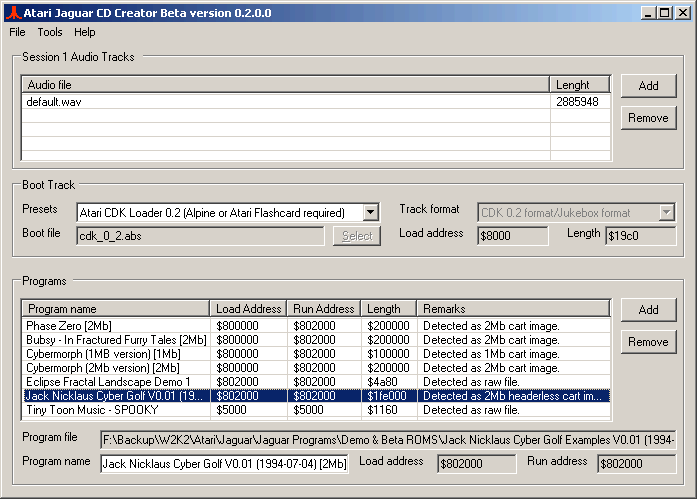
The main screen is divided in three parts namely the "Session1 Audio Tracks",
"Boot Track" and "Programs".
Every Jaguar CD needs in the first session one or more audio tracks. These
will be played on a normal CD player but can also contain audio tracks for use
in CD games. Use the "Add" and "Remove" button here to add/remove audio tracks
(wave or raw CD-audio files).
Also required is a boot track containing the boot program. You can select
here presets for the CDK 0.1 and CDK 0.2 boot menu's or single program CDs. When
selecting a single program CD, select the program file to burn by pressing the
"Select" button. For raw file format files you need to set the load address as
well.
In the third part you can select the program files to be loaded by the menu
boot track. Here you can enter the description of the file which will be
displayed in the menu.
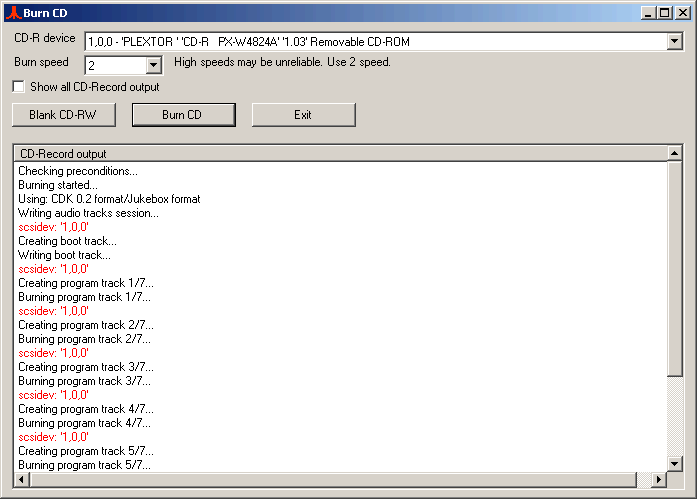
Finally select "Burn" in the "Tools" menu to burn the created layout to CD.
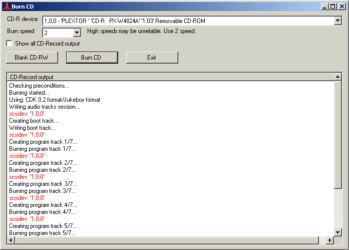
Jaguar CD Creator burn screen
Features
Supported file formats:
- Raw/header less files (.bin, .abs, .rom). Cart images will be auto
detected.
- COFF format (.cof).
- JaguarServer type 2 & 3 formats (.jag)
- Alcylon format (.abs). Not fully tested since I didn't find any files in
this format although it is the format produced by the Atari Linker.
- Not yet implemented: Relocatable GEMDOS format used by BJL (.prg).
- Did I forget any formats?
Supported CD formats:
- Plain Atari format (ATRI header/trailer tracks).
This format can be used by developers that write their own CD boot track.
- CDK 0.1 format for use with the Atari CDK 0.1 menu loader.
- CDK 0.2 format for use with the Atari CDK 0.2 and Mattias Domin's Jukebox
loaders.
- Planned: Mattias Domin's Jukebox format with pictures.
Known bugs/limitations:
- This program produces unencrypted CDs and can only be run on a
modified JaguarCD player or with a bypass cartridge.
Currently it is not possible to make encrypted Jaguar CDs on a PC
only.
- The CDK 0.1 & CDK 0.2 menu loaders only work in combination with an Alpine
or an Atari Flashcard. Even if your CD only contains RAM based programs. RAM
based programs will be loaded in Alpine/Flashcard. A special header will copy
the program to RAM and execute it.
To use RAM based programs without an Alpine/Flashcard, you must make a single
boot track CD for each program.
A loader that supports RAM based programs without an Alpine is on my list of
future projects.
- Many RAM based programs don't like the loaders and don't run. But others
do work. Creating a single boot track CD for such programs often helps.
- A few cart based games don't like the menu loaders (e.g. Mutant Penguins).
For these games follow the procedure: Load the game using the menu, When using
an Alpine, set the Alpine to read only, Reset the jaguar and boot from
Alpine/Flashcard. The game should now run.
- The CDK 0.1 loader has a bug that loads always the first track after
loading the menu making it impossible to select another track. To overcome
this problem, the first program file must be the included "Dummy Track". The
dummy track jumps back into the menu so you can select another track to load.
- Due to a bug in the CDK 0.2 loader, the menu can only have 10 programs.
Selecting program 11 or higher will just load program 1-10.
- On Windows 98, a DOS window is opened while burning a CD even when I told
CD-Record process not to start in a window. This is a bug/feature of the .NET
Framework with Windows 98. It does however NOT affect the working of the Jaguar CD Creator
but it looks a bit ugly. On Windows XP the DOS window is
not opened as intended.
Also on Windows 98 you probably need the Adaptec
ASPI driver v4.60 (Later versions don't work since that only detects SCSI
devices and not ATAPI devices)
Note: I don't support Windows
98/ME/2000 anymore.
History
- 5 July 2003: Version 0.3.0
- 6 December 2009: Version 0.3.1
- Second beta version with minor updates.
- Recompiled under Visual Studio 2008 targetting .NET 2.
- Updated cdrecord.exe from v2.01a11 (2003) with v2.01.01a69 (2009).
The old version didn't work with Windows XP SP2 and higher.
- Updated the command-line arguments for calls to cdrecord.exe to
comply with the new version.
- Added dummy burning mode. Simulates the writing process without
actually writing a CD.
- Removed ASPI driver installation files for Windows 98/ME/2000. No
more support for Windows 98/ME/2000.
Requirements and download
Download: Jaguar CD Creator Beta version 0.3.1 (Around 3 MB)
To install and run it you need to install the Microsoft .NET Framework 2.0 which
can be downloaded
through Windows update or the latest version can be downloaded
here.
The Jaguar CD Creator comes without any warranty. Thus if it creates
CDs that can't be run on your system, don't blame me. It is still Beta software
Thanks
Thanks to Glenn Bruner for finding the CDK loaders on the old Atari disks and
Matthias Domin for helping me with the CDK & Jukebox loaders. Also thanks to
Carl Forhan for providing the default audio track in the Jaguar CD Creator
software.
And finally many thanks to Jörg Schilling for the CD-Record software which is
used under water.